

I live in two places: a terminal running Claude Code and Neovim. For months I bounced between them. Edit in Neovim, alt-tab to the terminal, paste a file path, ask Claude something, alt-tab back, apply the change by hand. The friction was small but constant, and constant friction is the kind that wears a groove in your day.
The VS Code and JetBrains crowd already had the nice version of this: Claude living inside the editor, seeing the open file, the cursor, the selection, the diagnostics. Neovim didn’t. So I built it. It’s called claude-chat.nvim, and it’s 99.8% Lua.
Here’s what it looks like in practice:
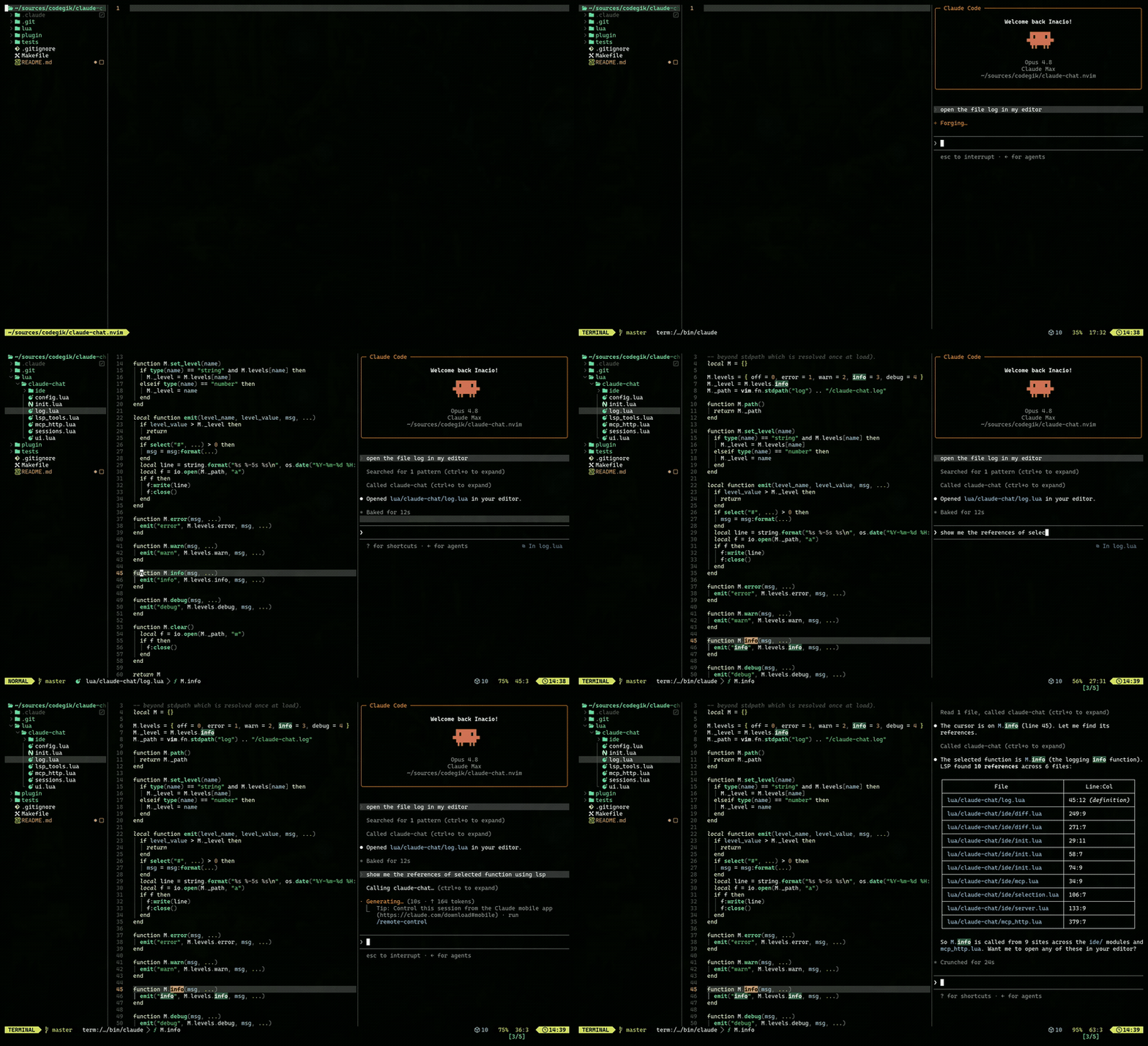 The Claude Code TUI living in a Neovim sidebar, aware of the file I’m editing.
The wrong way to build it
My first instinct — same as with everything — was the heavy one. Wrap the Anthropic API. Manage my own conversation state. Re-implement streaming. Rebuild permission prompts. Build a little chat UI in a Neovim buffer and pipe tokens into it.
That’s a lot of surface area, and every inch of it is something Claude Code already does and does better than I would. The moment I find myself re-implementing streaming or re-implementing a permission dialog, I’ve taken a wrong turn. The tool already owns those.
So I threw the idea out and asked a smaller question: what if I didn’t wrap anything at all?
Running the real thing
Claude Code is a terminal UI. Neovim has terminal buffers. The whole plugin, at its core, is just: launch the actual claude CLI as a child process inside a Neovim terminal buffer, in a sidebar.
That one decision pays for itself immediately. Because it is the real TUI, everything behaves exactly like running claude in a terminal — streaming replies, interactive permission prompts, session resume, all of it. I wrote zero code for any of those features. They came for free the instant I stopped trying to own them.
This is the same lesson I keep relearning: the best version of a tool is usually the one that does the least, because it lets the existing pieces do their jobs. My job was connection, not reconstruction.
The interesting part: making Neovim look like an IDE
A terminal in a sidebar is convenient, but it isn’t the real prize. The real prize is editor awareness — Claude knowing what file I’m looking at, where my cursor is, what I’ve selected, what the LSP is complaining about. That’s what makes the VS Code experience feel magical instead of just colocated.
It turns out Claude Code already knows how to talk to an editor. The VS Code and JetBrains extensions speak MCP over a WebSocket, and the CLI knows how to dial back into that connection. I didn’t have to invent a protocol — I had to speak the one that already exists.
So the plugin stands up two MCP servers, both bound to localhost with a per-session auth token:
- A WebSocket MCP server speaking the same protocol Claude’s IDE extensions use, to sync editor state — open files, cursor, selection, diagnostics.
- An HTTP MCP server hosting in-process tools like
open_file,current_file, and bridges into Neovim’s LSP — definitions, references, hover, symbol search.
The discovery handshake is the quietly satisfying bit. The plugin writes a lock file to ~/.claude/ide/<port>.lock and launches the CLI with CLAUDE_CODE_SSE_PORT set. The CLI finds the lock file, connects back, and from then on Claude can see my editor the same way it sees VS Code. It’s fully automatic — nothing to run by hand.
That LSP bridge is the part I’m most fond of. Claude doesn’t just get raw text; it gets the same semantic view I have. Ask it about a function and it can follow references and definitions through the project instead of guessing from strings.
What using it feels like
You toggle the sidebar with <leader>ai, push the current file into the conversation with <leader>af, and move between editor and chat with the usual <C-h/j/k/l>. When Claude proposes an edit, it shows up as a side-by-side diff in a scratch buffer before anything touches your file — you approve it like you would in any IDE.
Installation is the boring kind, which is how I like it:
1
2
3
4
5
6
{
  "codegik/claude-chat.nvim",
  cmd = { "ClaudeChat", "ClaudeChatReset", "ClaudeChatFile" },
  keys = { { "<leader>ai", "<cmd>ClaudeChat<cr>" } },
  config = function() require("claude-chat").setup() end,
}
You need Neovim 0.10+ and the claude CLI on your PATH. No API key for the plugin, no second login, no separate account — it reuses whatever Claude Code already set up, because of course it does. That was the whole point.
The lesson, again
There’s a version of this plugin that’s a sprawling application: an API client, a state store, a streaming renderer, a permission system. That version doesn’t exist, because none of it needed to. Claude Code owns the conversation and the auth. The MCP protocol owns the editor sync. Neovim’s terminal owns the rendering and its LSP owns the semantics. What I wrote was the wiring between things that were already there — plus enough protocol-speaking to make Neovim introduce itself as an IDE.
Good engineering keeps turning out to be subtraction. The code is on GitHub: codegik/claude-chat.nvim.